gangway.yml
gangway works out how to build and run most apps from their files (see
How gangway reads an app). A gangway.yml at the
root of the upload says what those files cannot: a different start command, a runtime version, a
database, how long the preview lives. Every key is optional, and an empty file changes nothing.
runtime: nodeversion: 22build: npm run buildstart: node dist/server.jsrelease: npm run migratehealthcheck: /healthzaddons: [postgres]ttl: 3dgangway.yaml works too. Keep one: with both, the deploy is refused.
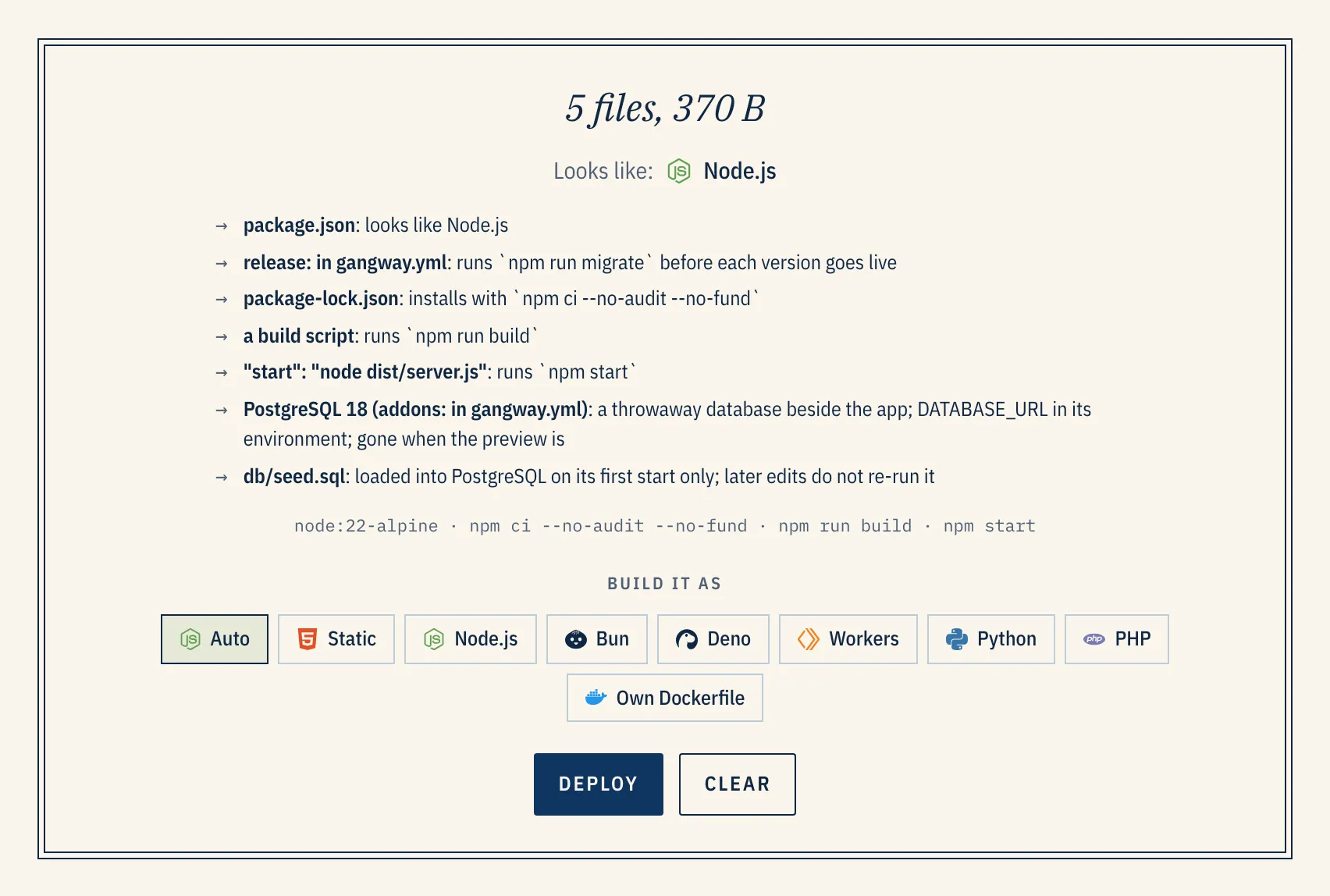
Drop the folder on New preview to see what gangway makes of it before anything is built. Each line of the plan names the file or key that decided it:
Where it applies
Section titled “Where it applies”| The upload has | gangway.yml |
|---|---|
| no compose file and no Dockerfile | used in full |
a Dockerfile at the root |
port, env, healthcheck, addons, ttl, idle, visibility and seed apply; the Dockerfile builds |
| a compose file at the root | ignored, with a warning: put the settings under x-gangway instead |
Setting runtime: builds with that runtime even when there is a Dockerfile or a compose file.
Editor support
Section titled “Editor support”gangway serves a JSON Schema for the file at https://api.<your-domain>/v1/schema/gangway.yml.
Point your editor at it for completion and inline errors. With the YAML language server (VS Code’s
YAML extension, Zed, Neovim), add this as the first line:
# yaml-language-server: $schema=https://api.preview.example.com/v1/schema/gangway.ymlA $schema: key in the file is also accepted and ignored.
Building
Section titled “Building”| Key | Takes | Without it |
|---|---|---|
runtime |
static, node, bun, deno, workerd, python or php |
detected from the files |
version |
a version the runtime offers (below), such as 22 or "3.13" |
the newest |
root |
a folder in the upload, such as app or apps/web |
the root, or the one folder holding the app if the root has no app files |
install |
a command, or false to skip it |
from the lockfile: npm ci, pnpm install, yarn install, bun install, pip install -r requirements.txt, composer install |
build |
a command, or false to skip it |
npm run build (or the pnpm, yarn or bun equivalent) if package.json has a build script |
start |
a command | a Procfile’s web:, the start script, package.json’s main, or an entry file such as server.js, main.py or index.ts |
release |
a command, run before each new version goes live | a Procfile’s release:, or nothing |
| Runtime | Versions |
|---|---|
node |
24, 22, 20 |
python |
3.14, 3.13, 3.12 |
php |
8.5, 8.4, 8.3 |
bun |
1.4 |
deno |
2.9 |
workerd |
1.20260922 |
static |
1.29 (nginx) |
Quote versions with a dot that ends in zero ("3.10"), or YAML reads them as numbers.
Serving
Section titled “Serving”| Key | Takes | Without it |
|---|---|---|
port |
the port the app listens on, 1–65535 | the runtime’s own (3000 for Node and Bun, 8000 for Python and Deno); also in $PORT |
healthcheck |
a path, such as /healthz, that answers 2xx once the app is ready |
gangway waits for any answer on the port |
static |
a folder of built files to serve, or true to find it |
Node and Bun run a server |
docroot |
the folder Apache serves, for PHP | public if public/index.php exists, else the root |
env |
a map of variable names to values, at most 100 | nothing extra |
static: turns a Node or Bun build into a static site served by nginx: gangway runs install and
build, then serves the folder you name. With static: true it looks for dist, build, out,
.output/public or dist/*/browser. gangway does this on its own when the start script is a
development server (vite, next dev, ng serve and the like) and there is a build.
env is for settings, not credentials: the file is in your repository. Set secrets from the
preview’s page, or with the MCP secrets tool.
The preview
Section titled “The preview”| Key | Takes | Without it |
|---|---|---|
addons |
a list of postgres, mysql and redis |
none, unless picked when deploying |
seed |
a command run in the app’s container after release, on each deploy |
nothing |
ttl |
how long the preview lives: 12h, 7d, 2w |
the server’s default |
idle |
how long without a request before it sleeps: 30m, or never |
the server’s default |
visibility |
public, unlisted or private |
the server’s default |
Durations are a whole number followed by s, m, h, d or w.
An add-on can pin its major version: addons: [{ id: postgres, version: 17 }]. Postgres offers 18,
17 and 16, MySQL 8.4 and Redis 8. A preview keeps the major version it started with, because the old
data directory would not open on another; pick a new one in a new preview. What each add-on puts in
the app’s environment is in Databases.
seed runs on every deploy, so write it to be safe to run twice (INSERT … ON CONFLICT DO NOTHING,
get_or_create). For a one-time SQL load, put a seed.sql or db/seed.sql in the upload instead:
it loads into Postgres or MySQL on the database’s first start only.
Commands
Section titled “Commands”A command is a string, which runs in sh, so $VARS, && and | work:
start: gunicorn app.wsgi --bind 0.0.0.0:$PORTor a list, which runs as it is, with no shell:
start: [gunicorn, app.wsgi, --bind, "0.0.0.0:8000"]Commands run from the app’s folder (root, if set). install and build run while the image
builds; release, seed and start run in the running container, with the add-ons’ variables set.
If release or seed fails, the deploy fails and says which.
What takes precedence
Section titled “What takes precedence”When the same setting comes from several places, the first of these wins:
- What you choose when you deploy: the runtime and databases on New preview, the
runtime,ttlandvisibilityof an API or MCP call. - The repository’s settings, for pull request previews.
gangway.yml.- The preview policy it follows, set in Admin → Previews.
Which keys each runtime uses
Section titled “Which keys each runtime uses”A key a runtime has no use for is ignored, and the plan says so with a warning rather than failing.
| Runtime | Ignores |
|---|---|
static |
install, build, start, release, static |
node, bun |
docroot; start when static: is set |
python, deno |
static, docroot |
workerd |
start, static, docroot (it runs wrangler’s main) |
php |
start, static (Apache serves it) |
When it is wrong
Section titled “When it is wrong”gangway checks the file before building anything. A bad key refuses the deploy and names it:
gangway.yml: version: Node.js offers 20, 22, 24gangway.yml: ttl: expected a duration like 12h or 7dgangway.yml: colour: Unrecognized key: "colour"The file can be at most 64 KiB, and unknown keys are errors, so a typo does not pass silently.
Recipes
Section titled “Recipes”A Vite or React app, served as static files after its build:
static: distDjango with a real server, a database and migrations:
runtime: pythonversion: "3.13"start: gunicorn mysite.wsgi --bind 0.0.0.0:$PORTrelease: python manage.py migrate --noinputaddons: [postgres]One app in a monorepo:
root: apps/webinstall: npm cistart: npm startLaravel, served from public/, with MySQL:
docroot: publicrelease: php artisan migrate --forceaddons: [mysql]A Dockerfile that listens on 8080 and needs Redis:
port: 8080healthcheck: /healthaddons: [redis]Compose stacks: x-gangway
Section titled “Compose stacks: x-gangway”A compose file is the whole configuration, so the settings go inside it under x-gangway:, once
for the stack and once per service:
x-gangway:  ttl: 7d  idle: 1h  visibility: unlisted  release: bin/rails db:migrate  seed: bin/rails db:seed # or { service: worker, command: … }
services: web: build: . x-gangway: primary: true # the preview's main URL port: 3000 health: /up admin: build: ./admin x-gangway: subdomain: admin # <preview>-admin.<domain> db: image: postgres:18-alpine x-gangway: expose: false| Stack key | Takes |
|---|---|
ttl |
a duration |
idle |
a duration, or never |
visibility |
public, unlisted or private |
release |
a command, run in the primary service before each version goes live |
seed |
a command run in the primary service, or { service, command } for another |
| Service key | Takes |
|---|---|
expose |
false to give the service no URL |
primary |
true for the service the preview’s own URL points at |
subdomain |
the name in its hostname, <preview>-<subdomain>, in place of the service’s |
port |
the container port to route to, when it exposes several |
health |
a path to wait on before the preview counts as up |
Add-ons are not offered with a compose file: declare the database as a service.